Showing posts with label Algorithm. Show all posts

HMAC functions in Delphi (HMAC_SHA256, HMAC_SHA1)

I came across HMAC (Hash-based message authentication code) functions when developing a RESTful client application in Delphi. The RESTful Web Service API required me to send HMAC_SHA256 signatures (Base64 encoded) with each HTTP request.

HMAC functions take two parameters: a key and a message. The purpose of the HMAC function is to authenticate the message and guarantee the data integrity of the message.

The cryptographic strength of the HMAC function lies on the underlying hashing function that it uses: MD5, SHA1, SHA256, etc.

So, these functions are usually are termed HMAC_SHA256, HMAC_SHA1, HMAC_MD5 to connote the core hashing function being used.

The outcome of a HMAC function is basically an array of bytes, but it is usually represented as a hexadecimal string or encoded as a Base64 string. (The RESTful Web Service API needed the Base64 encoded output).

I Googled around for a bit, but I didn’t get a clean implementation of HMAC_SHA256 in Delphi (encoded as Base64). I glued together the pieces from some questions on StackOverflow and coded an Indy based implementation that uses generics to specify the core hashing function.

Brief description: I created a helper class called THMACUtils. Note that this class uses generics to indicate the hashing algorithm (TIdHMACSHA256, TIdHMACSHA1). Three functions are provided:  the main thing happens in the HMAC(...) function; HMAC_HexStr(...) and HMAC_Base64(...) are simply decorations of the output.

unit HMAC;

interface

uses
  System.SysUtils,
  EncdDecd,
  IdHMAC,
  IdSSLOpenSSL,
  IdHash;

type
  THMACUtils<T: TIdHMAC, constructor> = class
  public
    class function HMAC(aKey, aMessage: RawByteString): TBytes;
    class function HMAC_HexStr(aKey, aMessage: RawByteString): RawByteString;
    class function HMAC_Base64(aKey, aMessage: RawByteString): RawByteString;
  end;

implementation

class function THMACUtils<T>.HMAC(aKey, aMessage: RawByteString): TBytes;
var
  _HMAC: T;
begin
  if not IdSSLOpenSSL.LoadOpenSSLLibrary then Exit;
  _HMAC:= T.Create;
  try
    _HMAC.Key := BytesOf(aKey);
    Result:= _HMAC.HashValue(BytesOf(aMessage));
  finally
    _HMAC.Free;
  end;
end;

class function THMACUtils<T>.HMAC_HexStr(aKey, aMessage: RawByteString): RawByteString;
var
  I: Byte;
begin
  Result:= '0x';
  for I in HMAC(aKey, aMessage) do
    Result:= Result + IntToHex(I, 2);
end;

class function THMACUtils<T>.HMAC_Base64(aKey, aMessage: RawByteString): RawByteString;
var
  _HMAC: TBytes;
begin
  _HMAC:= HMAC(aKey, aMessage);
  Result:= EncodeBase64(_HMAC, Length(_HMAC));
end;

end.

Below there’s an example of how to use the THMACUtils class.

program HMACSample;

{$APPTYPE CONSOLE}

{$R *.res}

uses
  System.SysUtils,
  HMAC,
  IdHMACSHA1,
  IdHashMessageDigest;

begin
  try
    Write('HMAC_SHA1("key", "message")'#9#9'= ');
    Writeln(THMACUtils<TIdHMACSHA1>.HMAC_HexStr('key', 'message' ));
    Writeln;

    Write('HMAC_SHA256("key", "message")'#9#9'= ');
    Writeln(THMACUtils<TIdHMACSHA256>.HMAC_HexStr('key', 'message' ));
    Writeln;

    Write('HMAC_SHA1_Base64("key", "message")'#9'= ');
    Writeln(THMACUtils<TIdHMACSHA1>.HMAC_Base64('key', 'message' ));
    Writeln;

    Write('HMAC_SHA256_Base64("key", "message")'#9'= ');
    Writeln(THMACUtils<TIdHMACSHA256>.HMAC_Base64('key', 'message' ));

    Readln;

  except
    on E: Exception do
      Writeln(E.ClassName, ': ', E.Message);
  end;
end.

The console application above looks like this:
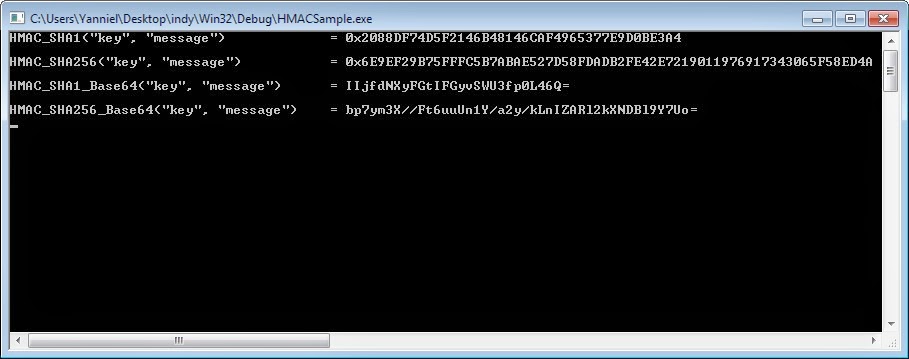
HMAC Sample Application Delphi

Big-O notation: Which algorithm performs better?

Suppose (ideally… again, ideally) that you have created different algorithms to solve a particular problem. Now, suppose that you have determined the order for those algorithms using Big-O notation. Which algorithm performs better? 

This ABC goes like this:

O(1) < O(log N) < O(N) < O(N log N) < O(N^2) < O(2^N) < O(N!) < O(N^N)

Constant running time is the best… then logarithmic, linear, linearithmic, quadratic, exponential, factorial and I leave the name of the last one to you :-)

Having constant, logarithmic and linear algorithms should be you goal, although this might be difficult to achieve. In real world problems, if your solution algorithm is higher than quadratic, I would advise you to drop it…

I have seen lots of people get frozen with a simple question: which function grows faster? Remember the correlation above…it’s easy.
 
Notice: Having a O(1) ,O(log N) or O(N) algorithm doesn’t guarantee that your code is well written or optimized. Even with those orders there might be place for improvements and refactoring.

How to implement a tag cloud. Learn by example

A tag cloud [1] is a list of terms in which each item has a corresponding weight. The weight represents the importance or popularity of each term.

Tag clouds usually have a visual representation, and the weight can be translated into a different font size, color, style, text orientation and others. Changing the appearance of each tag in the cloud allows the readers to perform a quick scan and detect the most ranked terms in the cloud.

One final consideration is that tags are generally linked to some related content. This can be achieved for example, by means of a hypertext link (...a href=...) anchored to the affine content.

There are several algorithms to implement a tag cloud; however, right now I'm going to use a fairly simple one: it just changes the font size of the tag depending on the number of occurrences per tag. The general formula (taken from Wikipedia and adjusted by me) is:

Si = |Fmax*(Ti - Tmin)/ (Tmax - Tmin)|

for |Fmax*(Ti - Tmin)/ (Tmax - Tmin)| > 90%;

else Si =90%.

Where:
  • i: is an index ranging from 1 to the total number of tags in the cloud.
  • Si: is the display font size of tag i. You need to calculate Si for each tag in the cloud.
  • Fmax: is the maximum font size value to display. This value is chosen by the user.
  • Ti: is the number of occurrences of tag i.
  • Tmin: is the minimum of all Ti values.
  • Tmax: is the maximum of all Ti values.
Too difficult to understand? Patience, you'll get there:

Consider the following list of twenty tags. The number of occurrences is shown inside red square brackets "[...]":

linda evangelista [9]
toaster [12]
brad richards [7]
max talbot [13]
fireworks [10]
library of congress [12]
bohemian grove [15]
declaration of independence [2]
17 day diet [16]
independence day [10]
white sox [5]
blaise pascal [4]
ewan mcgregor [10]
kate moss [6]
princess diana [10]
traffic [1]
janet jackson [11]
canada day [8]
scott pilgrim vs. the world [10]
paul newman [18]

For the list of tags above, the corresponding Ti values are: T1=9; T2=12; T3=7; T4=13; T5=10; T6=12; T7=15; T8=2; T9=16; T10=10; T11=5; T12=4; T13=10; T14=6; T15=10; T16=1; T17=11; T18=8; T19=10; T20=18.

Now, it's easy to see that Tmax=T20=18 and Tmin=T16=1. Finally, let's set Fmax=300% [2] and let's calculate each Si:

S1 = |300% * (9 -1) /(18-1)| = 141.17% = 141%

S2 = |300% * (12 -1) /(18-1)| = 194.11% = 194%

S3 = |300% * (7 -1) /(18-1)| = 105.88% = 106%

S4 = |300% * (13 -1) /(18-1)| = 211.76% = 212%

S5 = |300% * (10 -1) /(18-1)| = 158.82% = 159%

S6 = |300% * (12 -1) /(18-1)| = 194.11% = 194%

S7 = |300% * (15 -1) /(18-1)| = 247.05% = 247%

S8 = |300% * (2 -1) /(18-1)| = 17.64% = 18%;
as S8 = 18% < 90%, then S8 = 90%.

S9 = |300% * (16 -1) /(18-1)| = 264.70% = 265%

S10 = |300% * (10 -1) /(18-1)| = 158.82% = 159%

S11 = |300% * (5 -1) /(18-1)| = 70.58% = 71%;
as S11 = 71% < 90%, then S11 = 90%.

S12 = |300% * (4 -1) /(18-1)| = 52.94% = 53%;
as S12 = 53% < 90%, then S12 = 90%.

S13 = |300% * (10 -1) /(18-1)| = 158.82% = 159%

S14 = |300% * (6 -1) /(18-1)| = 88.23% = 88%;
as S14 = 88% < 90%, then S14 = 90%.

S15 = |300% * (10 -1) /(18-1)| = 158.82% = 159%

S16 = |300% * (1 -1) /(18-1)| = 0% = 0%;
as S16 = 0% < 90%, then S16 = 90%.

S17 = |300% * (11 -1) /(18-1)| = 176.47% = 176%

S18 = |300% * (8 -1) /(18-1)| = 123.52% = 124%

S19 = |300% * (10 -1) /(18-1)| = 158.82% = 159%

S20 = |300% * (18 -1) /(18-1)| = 300% = 300%

Using the information above we can generate HTML code like this (the line feeds were added just for readability purposes):

<a href="http://www.yanniel.info/search?q=linda+evangelista" rel="tag" style="font-size: 141%;">linda evangelista</a>

<a href="http://www.yanniel.info/search?q=toaster" rel="tag" style="font-size: 194%;">toaster</a>

<a href="http://www.yanniel.info/search?q=brad+richards" rel="tag" style="font-size: 106%;">brad richards</a>

<a href="http://www.yanniel.info/search?q=max+talbot" rel="tag" style="font-size: 212%;">max talbot</a>

<a href="http://www.yanniel.info/search?q=fireworks" rel="tag" style="font-size: 159%;">fireworks</a>

<a href="http://www.yanniel.info/search?q=library+of+congress" rel="tag" style="font-size: 194%;">library of congress</a>

<a href="http://www.yanniel.info/search?q=bohemian+grove" rel="tag" style="font-size: 247%;">bohemian grove</a>

<a href="http://www.yanniel.info/search?q=declaration+of+independence" rel="tag" style="font-size: 90%;">declaration of independence</a>

<a href="http://www.yanniel.info/search?q=17+day+diet" rel="tag" style="font-size: 265%;">17 day diet</a>

<a href="http://www.yanniel.info/search?q=independence+day" rel="tag" style="font-size: 159%;">independence day</a>

<a href="http://www.yanniel.info/search?q=white+sox" rel="tag" style="font-size: 90%;">white sox</a>

<a href="http://www.yanniel.info/search?q=blaise+pascal" rel="tag" style="font-size: 90%;">blaise pascal</a>

<a href="http://www.yanniel.info/search?q=ewan+mcgregor" rel="tag" style="font-size: 159%;">ewan mcgregor</a>

<a href="http://www.yanniel.info/search?q=kate+moss" rel="tag" style="font-size: 90%;">kate moss</a>

<a href="http://www.yanniel.info/search?q=princess+diana" rel="tag" style="font-size: 159%;">princess diana</a>

<a href="http://www.yanniel.info/search?q=traffic" rel="tag" style="font-size: 90%;">traffic</a>

<a href="http://www.yanniel.info/search?q=janet+jackson" rel="tag" style="font-size: 176%;">janet jackson</a>

<a href="http://www.yanniel.info/search?q=canada+day" rel="tag" style="font-size: 124%;">canada day</a>

<a href="http://www.yanniel.info/search?q=scott+pilgrim+vs.+the+world" rel="tag" style="font-size: 159%;">scott pilgrim vs. the world</a>

<a href="http://www.yanniel.info/search?q=paul+newman" rel="tag" style="font-size: 300%;">paul newman</a>

That HTML code renders a tag cloud like the one below:


Notice that if you click on a tag it will search any related content withing my blog. Try it!

Notes:
[1] A tag cloud is also referred as a word cloud or weighted list. In this context, tag is a synonym of term; sometimes even a synonym of word. Nevertheless, I don't like the latest assumption, because the practical experience shows that a tag can be formed using two words or more.
[2] You can chose whatever value you want for this parameter. However, depending on what you set, the appearance of the tags in the cloud might vary.